

Introduction
The Mesa Upgrade is Mina Protocol’s next network upgrade, introducing a series of improvements designed to expand what can be built on Mina, improve network performance, and make future upgrades smoother and more efficient. From increasing the capacity of zkApp applications to reducing slot times, Mesa lays the groundwork for the next phase of Mina’s evolution.
Following a series of internal and public testing rounds, the Mina Protocol developers and community are confident in the software and processes to upgrade the Mina Protocol Mainnet.
This upgrade is the final milestone in the ‘Road to Mesa’ bringing months of development, testing, and ecosystem preparation to Mainnet.
This document outlines the Mainnet Upgrade process, including the actions required from node operators and other ecosystem participants. Please review the relevant steps carefully ahead of the upgrade to help ensure a smooth transition.
For additional support, please refer to the Mina Protocol Discord server.
Node Auto-restart
Ensure your nodes are set to restart automatically after a crash. For guidance, refer to the auto-restart instructions. For further assistance or configuration options, join our Discord #mainnet-block-producers channel.
Public Mainnet Endpoints
Archive node API: archive-node-api.gcp.o1test.net
GraphQL endpoint: mainnet-plain-1.gcp.o1test.net/graphql
Rosetta: mainnet-rosetta.gcp.o1test.net
Recommended Hardware Requirements
Please note the following are the hardware requirements for each node type after the upgrade:
| Node Type | Memory | CPU | Storage | Network |
|---|---|---|---|---|
| Mina Daemon Node | 32 GB RAM | 8 core processor with BMI2, ADX and AVX CPU instruction set are required |
64 GB | 1 Mbps Internet Connection |
| SNARK Coordinator | 32 GB RAM | 8 core processor | 64 GB | |
| SNARK Worker | ~4 GB RAM per SNARK process | 6 cores / 12 threads per SNARK process with BMI2, ADX and AVX CPU instruction |
64 GB | |
| Archive Node | 32 GB RAM | 8 core processor | 64 GB | |
| Rosetta API standalone Docker image | 8 GB RAM | 2 core processor | 16 GB | |
| Rosetta API + Archive Node | 32 GB RAM | 8 core processor | 64 GB | |
| Mina Seed Node | 64 GB RAM | 8 core processor | 16 GB |
Mainnet Upgrade Timeline
| Date | Time (UTC) | Task | Status | Owner |
|---|---|---|---|---|
| Pre-Upgrade | ||||
| Fri Aug 21 | Mainnet stop-slot-release build published | Completed | o1Labs | |
| Fri Aug 21 | Community and Partners upgrade to the stop-slot-release | Completed | Block Producers and SNARK Workers | |
| Fri Aug 21 ~ | Share Mainnet upgrade schedule in Discord & Twitter | Completed | o1Labs | |
| Mon Aug 31 | Mainnet upgrade GO/NO GO decision | Completed | o1Labs | |
| State Finalization | ||||
| Thu Sept 3 | 10:00 | stop-transaction-slot | Completed | Milestone |
| Thu Sept 3 | 10:00 | BPs keep their nodes running until after the stop-network-slot at 15:00 UTC | Completed | Block Producers |
| Thu Sept 3 | 15:00 | stop-network-slot | Completed | Milestone |
| Thu Sept 3 | 15:00 | AutoStart of Post-Upgrade Mesa Mainnet Infrastructure | Completed | Block Producers using Automode, o1Labs |
| Thu Sept 3 | From 15:00 ~ 18:00 | Archive Node Schema upgrade step | Completed | Archive Node Operators |
| Upgrade | ||||
| Thu Sept 3 | 15:00 | o1Labs prepares and builds the Mesa packages | Completed | o1Labs |
| Thu Sept 3 | 16:30 | Mesa Package Published | Completed | Milestone |
| Thu Sept 3 | 16:30 | Community and partners upgrade their nodes | Completed | Block Producers and SNARK workers running Manual Mode |
| Thu Sept 3 | 16:30 | Community archive nodes and Rosetta API upgrade | Completed | Archive Node Operators |
| Post-Upgrade | ||||
| Thu Sept 3 | 18:00 | 1st Mesa Slot | Completed | Milestone |
| Thu Sept 3 | 18:00 ~ | Monitor Mainnet Mesa network | Completed | o1Labs, Node Operators |
| Sun Sept 6 | Check min-window density after 2.25 days of grace period | Completed | o1Labs | |
Mainnet Upgrade steps
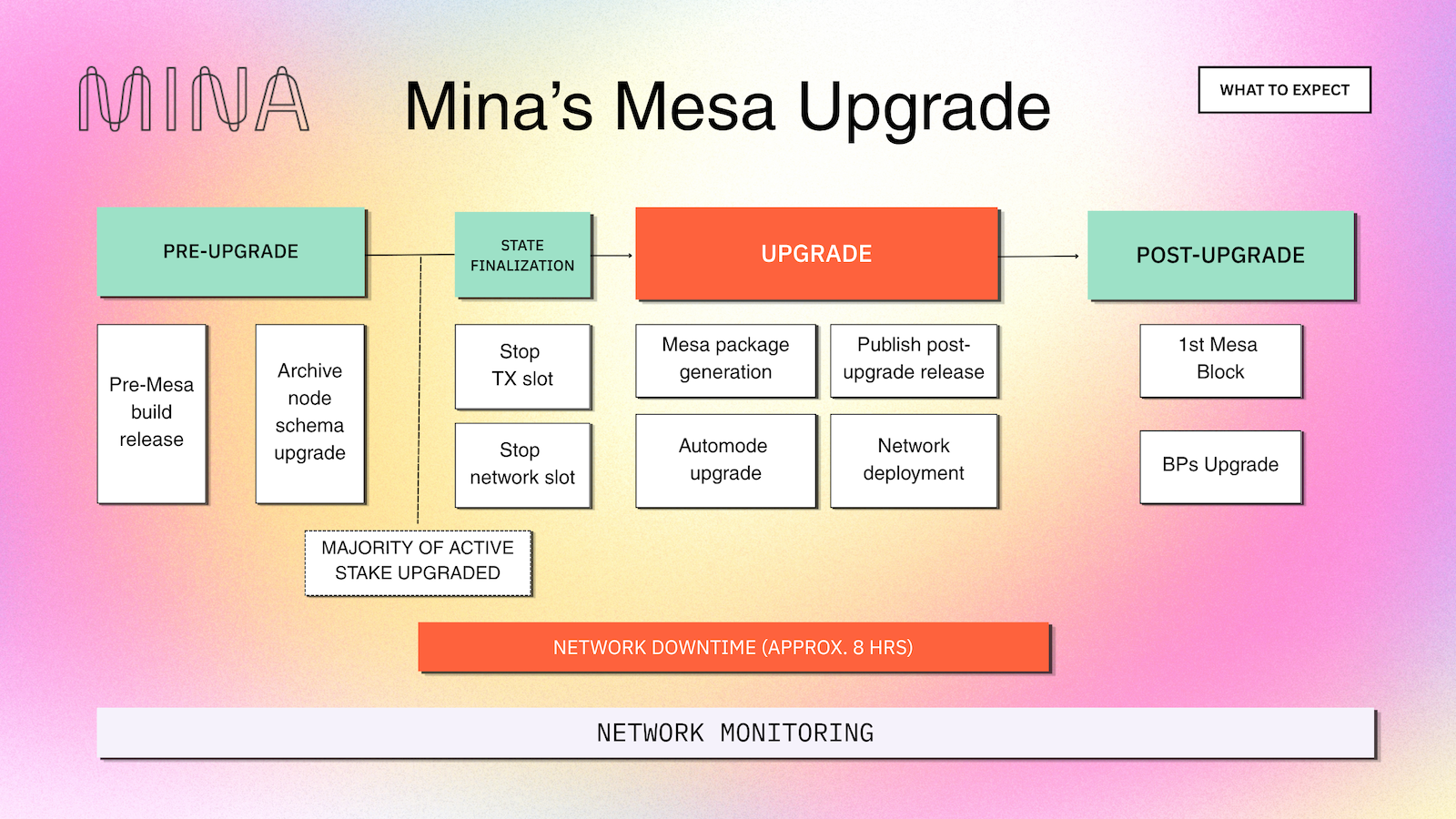
Detailed upgrade steps and operators' tasks
|
Pre-Upgrade |
Please note: a simplified Node Status service will be part of the upgrade tooling and enabled by default in the Pre-Upgrade stop-slot-release. This feature will allow for a safe upgrade by monitoring the amount of upgraded active stake. Only non-sensitive data will be reported. If operators are not comfortable sharing their node version, they will have the option to disable the node version reports by using the node flag “–node-status-url none” |
|
Block Producers and SNARK Workers |
|
|
Archive Node Operators and Rosetta Operators |
|
|
Exchanges |
|
|
State Finalization |
|
|
Block Producers and SNARK Workers |
|
|
Archive Node Operators and Rosetta Operators |
|
|
Exchanges |
|
|
Upgrade |
|
|
Block Producers and SNARK Workers |
|
|
Archive Node Operators and Rosetta Operators |
Please note: Operators are required to perform the post fork operations described in: https://docs.minaprotocol.com/network-upgrades/mesa/archive-upgrade. |
|
Exchanges |
|
|
Post-Upgrade |
|
|
Block Producers and SNARK Workers |
|
|
Archive Node Operators and Rosetta Operators |
|
|
Exchange and Builders |
|
Post-Upgrade Flags and Configurations for Mainnet
Please refer to the Mesa node release notes: Automode here and Manual/Legacy mode here.
Network details
Chain ID
29936104443aaf264a7f0192ac64b1c7173198c1ed404c1bcff5e562e05eb7f6

Git SHA-1
dc6bf78b8ddbbca3a1a248971b76af1514bf05aa

Seed List
https://bootnodes.minaprotocol.com/networks/mainnet.txt

Node build
https://github.com/MinaProtocol/mina/releases/tag/4.0.0-mainnet
Block Producer
Start your node in the Mainnet with the flags and environment variables listed below.
mina daemon
--block-producer-key <path to the wallet private key file>
--config-directory <path to the mina configuration directory>
--external-ip <external server IP>
--enable-peer-exchange
--file-log-level Debug
--file-log-rotations 500
--generate-genesis-proof true
--libp2p-keypair <keyfile path>
--log-json
--peer-list-url https://bootnodes.minaprotocol.com/networks/mainnet.txt
ENVIRONMENT VARIABLES
RAYON_NUM_THREADS=6
MINA_LIBP2P_PASS
MINA_PRIVKEY_PASS
---
(only for mina-daemon-auto-hardfork)
MINA_HARDFORK_STATE_DIR=<path to the mina configuration directory>
SNARK Coordinator
Configure your node in the Mainnet with specific flags and environment variables as listed.
mina daemon
--config-directory <path to the mina configuration directory>
--enable-peer-exchange true
--external-ip <external server IP>
--file-log-level Debug
--file-log-rotations 500
--libp2p-keypair <keyfile path>
--log-json
--peer-list-url https://bootnodes.minaprotocol.com/networks/mainnet.txt
--run-snark-coordinator <public key>
--snark-worker-fee 0.001
--work-selection [seq|rand|roffset]

ENVIRONMENT VARIABLES
MINA_LIBP2P_PASS
SNARK Workers
Connect to the SNARK Coordinator node if required and run the following flags.
mina internal snark-worker
--proof-level full
--shutdown-on-disconnect false
--daemon-address <snark coordinator IP:port>

ENVIRONMENT VARIABLES
RAYON_NUM_THREADS:8
Archive Node
Running the Archive Node using Docker
When you execute the archive node using docker compose, all the required packages and database exports will be automatically downloaded and installed. Please refer to the official archive node preview documentation for more information.
Running the Archive Node using .deb packages
Running an archive node using .deb packages involves setting up a non-block-producing node and a PostgreSQL database configured with specific flags and environment variables.
For more information about running archive nodes, see Archive Node.
The PostgreSQL database requires two schemas:
- The PostgreSQL schema used by the Mina archive database: in the Release Notes
- Mesa:
- Berkeley:
- https://github.com/MinaProtocol/mina/releases/tag/3.5.0-mainnet-stop-slot in the release notes
The non-block-producing node must be configured with the following flags:
mina daemon
--archive-address <archive_address>:<archive_port - use 3086>
--config-directory <path to mina config>
--enable-peer-exchange true
--external-ip <external server IP>
--file-log-level Debug
--file-log-rotations 500
--generate-genesis-proof true
--libp2p-keypair <keyfile path>
--log-json
--peer-list-url https://bootnodes.minaprotocol.com/networks/mainnet.txt

ENVIRONMENT VARIABLES
MINA_LIBP2P_PASS
This non-block-producing node connects to the archive node with the addresses and port specified in the “–archive-address” flag.
The archive node command looks like this:
mina-archive run
--metrics-port <port>
--postgres-uri postgres://<user>:<password>@<address>:<port>/<db>
--server-port 3086
--log-json
--log-level DEBUG
Rosetta API Docker Image in Mainnet
Use the following command to start the standalone Rosetta API Docker image:
docker run --rm --name rosetta \
--entrypoint=./docker-start.sh \
-p 8302:8302 -p 3085:3085 -p 3086:3086 -p 3087:3087 \
-e MINA_NETWORK=mainnet \
-e PEER_LIST_URL=https://bootnodes.minaprotocol.com/networks/mainnet.txt \
-e MINA_ARCHIVE_DUMP_URL=https://storage.googleapis.com/mina-archive-dumps \
-e BLOCKS_BUCKET=https://storage.googleapis.com/mina_network_block_data \
{IMAGE}
Port configuration
Nodes must have the following ports public (accessible with a node’s external ip):
- libp2p port uses 8302 by default
Generation of libp2p keypair
Each node within the network must possess its own distinct libp2p key pair, although the same libp2p keys can be reused from before the upgrade, in case you need to manually generate new libp2p keys use the following command:
mina libp2p generate-keypair -privkey-path <path-to-the-key-file>
Further information on generating libp2p key pairs on Mina Protocol.
Upgrading zkApps to MESA (o1js 3.0)
The MESA hardfork introduces protocol-level changes that affect all deployed zkApps. After the hardfork, proofs generated with old verification keys will no longer verify. This guide explains why that happens, how the protocol helps you upgrade, and the exact steps to migrate your zkApp. For further information on o1js and upgrading zkApps, please see https://docs.o1labs.org/o1js/zkapps/upgrade-mesa.
Why you need to upgrade
When a hardfork changes protocol constants, the circuit constraints change too. This means:
- Verification keys change. Compiling the same contract with o1js 3.0 produces a different verification key than o1js 2.x.
- Old proofs stop verifying. The network rejects proofs generated against the old verification key because the underlying constraint system no longer matches.
Until you update the verification key stored on-chain, your zkApp cannot process any new proof-authorized transactions.
How the protocol enables upgrades
Every zkApp account stores a setVerificationKey permission that controls who can change the verification key. This permission has a special structure: (Auth_required.t, txn_version) – it pairs an authorization type (none, signature, proof, impossible) with a transaction version number.
After a hardfork, the protocol version increases. When the txn_version stored on your account is older than the current protocol version, fallback logic activates:
- impossible falls back to signature
- proof falls back to signature
- signature and none remain unchanged
This means that regardless of how locked your verification key was before the hardfork, you can update it with a simple signed transaction during the upgrade window.
The same fallback logic applies to the access permission. If your account had access: proof, it temporarily falls back to signature so the upgrade transaction can interact with the account.
Note: After the upgrade transaction sets a new verification key, the txn_version on the account is bumped to the current protocol version. This means the fallback window closes automatically – your original permission semantics are restored. If setVerificationKey was impossible, it becomes impossible again after the upgrade.
Upgrade steps
Prerequisites
- The private key of the zkApp account (the key pair used to deploy the contract)
- Your contract source code
- o1js 3.0 (npm install o1js@3)
Step 1: Update o1js and compile
Update o1js to version 3.0 and compile your contract. The compilation produces a new verification key compatible with the MESA protocol.
import { MyContract } from ‘./my-contract.js’;
// Compile with o1js 3.0 to get the MESA-compatible verification key
const { verificationKey } = await MyContract.compile();
Step 2: Send the upgrade transaction
Create a transaction that sets the new verification key on your zkApp account. This transaction is authorized by a signature from the zkApp’s private key – not a proof.
import { AccountUpdate, Mina, PrivateKey, fetchAccount } from ‘o1js’;
// Your zkApp’s private key (the one used during deployment)
const zkAppKey = PrivateKey.fromBase58(‘…’);
const zkAppAddress = zkAppKey.toPublicKey();
// Fee payer
const senderKey = PrivateKey.fromBase58(‘…’);
const sender = senderKey.toPublicKey();
// Fetch latest account state
await fetchAccount({ publicKey: zkAppAddress });
await fetchAccount({ publicKey: sender });
// Build the upgrade transaction
const tx = await Mina.transaction({ sender, fee: 100_000_000 }, async () => {
const accountUpdate = AccountUpdate.createSigned(zkAppAddress);
accountUpdate.account.verificationKey.set(verificationKey);
});
// Sign with BOTH the fee payer key and the zkApp key
const pendingTx = await tx.sign([senderKey, zkAppKey]).send();
await pendingTx.wait();
The critical parts:
- AccountUpdate.createSigned(zkAppAddress) creates an account update that requires a signature from the zkApp account. This is what triggers the fallback logic for permissions like impossible and proof.
- Sign with the zkApp key. The transaction must be signed with the zkApp’s private key (zkAppKey), not just the fee payer key.
Step 3: Verify the upgrade
After the transaction is included in a block, send a proof-authorized transaction to confirm your contract works with the new verification key.
const zkApp = new MyContract(zkAppAddress);
await fetchAccount({ publicKey: zkAppAddress });
await fetchAccount({ publicKey: sender });
const tx = await Mina.transaction({ sender, fee: 100_000_000 }, async () => {
await zkApp.myMethod(/* args */);
});
const provenTx = await tx.prove();
const pendingTx = await provenTx.sign([senderKey]).send();
await pendingTx.wait();
That’s it. Your zkApp is now running on the MESA protocol with restored permission semantics.
Permission scenarios
The upgrade process works the same way regardless of your original permission configuration. Here’s how each scenario is handled:
Default permissions
No special considerations. The default setVerificationKey permission is signature, so the upgrade transaction works directly without needing the fallback logic.
setVerificationKey: impossibleDuringCurrentVersion
Before the hardfork, the verification key could not be changed by anyone. After the hardfork, the fallback converts impossible to signature, allowing the upgrade. Once the upgrade transaction is processed and the txn_version is bumped, the permission reverts to impossible for the new protocol version.
setVerificationKey: proofDuringCurrentVersion
Before the hardfork, the verification key could only be changed via a proof (e.g., through a contract method like updateVk). After the hardfork, old proofs no longer verify, so the fallback converts proof to signature. After the upgrade, the permission reverts to proof – you’ll need valid proofs to change the VK again.
access: proof
If your account required proof authorization for any interaction (access: proof), the fallback also converts this to signature during the upgrade window. This ensures the signature-based VK upgrade transaction can access the account. After the txn_version bumps, access: proof is restored.
setPermissions: impossible
This is not a blocker for the upgrade. The upgrade transaction only sets the verification key – it does not need to modify permissions. The txn_version bump happens automatically as part of the VK update, so there’s no separate step needed to update permissions.
access: impossible
If access was set to impossible, the account was intentionally made permanently inaccessible. The protocol does not provide a fallback for this case – the account remains locked. This is by design: access: impossible signals that the developer never wants any interaction with the account again.
Full upgrade script example
Here is a complete, copy-pasteable script that upgrades a zkApp:
import { AccountUpdate, Field, Mina, PrivateKey, fetchAccount } from ‘o1js’;
import { MyContract } from ‘./my-contract.js’;
// — Configuration —
const GRAPHQL_ENDPOINT = ‘https://api.minascan.io/node/mainnet/v1/graphql’;
const ZKAPP_KEY = ‘…’; // zkApp private key (base58)
const SENDER_KEY = ‘…’; // fee payer private key (base58)
const TX_FEE = 100_000_000; // 0.1 MINA
// — Setup —
const network = Mina.Network(GRAPHQL_ENDPOINT);
Mina.setActiveInstance(network);
const zkAppKey = PrivateKey.fromBase58(ZKAPP_KEY);
const zkAppAddress = zkAppKey.toPublicKey();
const senderKey = PrivateKey.fromBase58(SENDER_KEY);
const sender = senderKey.toPublicKey();
console.log(`zkApp address: ${zkAppAddress.toBase58()}`);
console.log(`Fee payer: ${sender.toBase58()}`);
// — Step 1: Compile to get the new verification key —
console.log(‘\nCompiling contract…’);
const { verificationKey: newVK } = await MyContract.compile();
console.log(`New verification key hash: ${newVK.hash.toString()}`);
// — Step 2: Upgrade the verification key —
console.log(‘\nUpgrading verification key…’);
await fetchAccount({ publicKey: zkAppAddress });
await fetchAccount({ publicKey: sender });
const upgradeTx = await Mina.transaction({ sender, fee: TX_FEE }, async () => {
const accountUpdate = AccountUpdate.createSigned(zkAppAddress);
accountUpdate.account.verificationKey.set(newVK);
});
const pendingUpgrade = await upgradeTx.sign([senderKey, zkAppKey]).send();
console.log(`Upgrade TX hash: ${pendingUpgrade.hash}`);
await pendingUpgrade.wait();
console.log(‘Verification key upgraded successfully.’);
// — Step 3: Verify with a proof-authorized transaction —
console.log(‘\nVerifying upgrade with a proof transaction…’);
const zkApp = new MyContract(zkAppAddress);
await fetchAccount({ publicKey: zkAppAddress });
await fetchAccount({ publicKey: sender });
const testTx = await Mina.transaction({ sender, fee: TX_FEE }, async () => {
await zkApp.myMethod(/* your args here */);
});
const provenTx = await testTx.prove();
const pendingTest = await provenTx.sign([senderKey]).send();
console.log(`Test TX hash: ${pendingTest.hash}`);
await pendingTest.wait();
console.log(‘\nUpgrade complete! Your zkApp is running on MESA.’);
FAQ
Do I need to redeploy my contract?
No. You only need to update the verification key. Your on-chain state and account balance are all preserved.
What if I lost my zkApp private key?
You need the zkApp’s private key to sign the upgrade transaction. If you’ve lost it, you cannot upgrade the contract. This is why it’s critical to securely back up your zkApp key pair.
Does my on-chain state change during the upgrade?
No. The upgrade transaction only modifies the verification key field. All @state fields remain exactly as they were.
Can I change my contract logic during the upgrade?
Yes. If you modify your contract code before compiling, the new verification key will reflect the updated logic. The upgrade transaction sets whatever verification key you provide – it doesn’t have to match the original contract.
What happens if I don’t upgrade?
Your zkApp will be unable to process any proof-authorized transactions. The on-chain state becomes frozen because no valid proofs can be generated against the old verification key. The account and its funds remain safe, but the contract is effectively paused until you upgrade.
Is the upgrade window limited?
The fallback logic activates whenever the account’s txn_version is older than the current protocol version. This remains true until you perform the upgrade, so there is no deadline. However, upgrading promptly is recommended so your zkApp remains functional.
Feedback and Questions
Thank you for participating in the Mainnet upgrade.
If you have any questions or feedback related to the Mainnet upgrade, please use the dedicated Discord #mainnet-block-producers channel.
Appendix 1 - Archive Node Schema Changes between Berkeley and Mesa
If you are using the Archive Node database directly for your system integrations, then you should understand all the changes that might impact your applications. This appendix lists the changes between the archive schema that Mainnet runs today (protocol version 3.0.0) and the Mesa archive schema (protocol version 4.0.0). The change set is small: the zkApp on-chain state increases from 8 to 32 field elements (a field element is one value of the finite field that the proof system uses), and the maximum number of event elements and action elements in one zkApp command increases from 100 to 1024.
Schema differences
- Constrains Dropped
- We’ve removed the uniqueness constraint from the element_ids column of two tables:
- zkapp_field_array, zkapp_events
- We’ve removed the uniqueness constraint from the element_ids column of two tables:
- Indexes Dropped
-
- We’ve removed the index from the element_ids column of two tables.
- zkapp_field_array, zkapp_events
- We’ve removed the index from the element_ids column of two tables.
- New Tables Added
- We’ve introduced the following new tables:
- migration_history
- We’ve introduced the following new tables:
- Updated Tables
- The following tables have been updated
- zkapp_states, zkapp_states_nullable, zkapp_field_array, zkapp_events, zkapp_account_update_body
- The following tables have been updated
Differences per table
- zkapp_states
- Added columns: element8 to element31. Type int, NOT NULL, foreign key to zkapp_field(id). For rows that exist before the migration, the migration puts in these columns the id of the field value 0.
- zkapp_states_nullable
- Added columns: element8 to element31. Type int, nullable, foreign key to zkapp_field(id). For rows that exist before the migration, these columns stay NULL.
- zkapp_field_array
- Dropped constraint: zkapp_field_array_element_ids_key
- Dropped index: idx_zkapp_field_array_element_ids
- The rows are no longer deduplicated by content. Two identical arrays now give two rows that have different id values. Do not use the row id as an identity of the array content.
- zkapp_events
- Dropped constraint: zkapp_events_element_ids_key
- Dropped index: idx_zkapp_events_element_ids
- The rows are no longer deduplicated by content, as for zkapp_field_array.
- zkapp_account_update_body
- Changed columns: events_id and actions_id. The NOT NULL constraint is removed from both.
- NULL now has the meaning “empty list”. Before the upgrade, an empty events list or an empty actions list wrote a row in zkapp_events that held an empty array. After the upgrade, no row is written and the reference is NULL.
- A query that joins on these two columns must use an outer join (LEFT JOIN). If it uses an inner join, it loses all account updates that have no events or no actions.
- migration_history
- New table, written by the migration script.
- Columns: commit_start_at (timestamptz, primary key), protocol_version (text), migration_version (text), description (text), status (enumeration migration_status, with the values starting, applied and failed).
- A database that is newly created from the Mesa create_schema.sql does not contain this table. The table exists only in a migrated database.
Rosetta API changes
Rosetta API response format
Two changes are visible in the response data, not in the structure:
- More Operation objects for zkApp transactions. /block and /search/transactions can now return more operations in the same operations array than before. :
- A zkApp command can apply the same account update more than one time. The old SQL joined with = ANY (array), which counted a repeated update one time only, and thus lost N−1 zkapp_balance_update operations. Mesa expands the array positionally, so each occurrence gives its own operation.
- An account created by a zkApp account update now gets an explicit creation-fee operation.
- /network/options — the allow.operation_types array gets one more string: account_creation_fee_via_zkapp. This is an addition to an existing array. If your parser rejects unknown operation types, add this one.
Transaction signing format
One item can look like a change but is not one. User_command.Stable goes from V2 to V3 on Mesa, but only because its zkApp arm moved from Zkapp_command.Stable.V1 to V2. The signed-command arm stays
Signed_command.Stable.V2. Rosetta construction builds payments and delegations only (sendPayment and sendDelegation in construction.ml), so this version bump does not reach your signer.
The Mesa zkApp state size did change (8 to 32 field elements in zkapp_state.ml). That affects code that builds zkApp commands. It does not affect payment or delegation signing, and Rosetta cannot build zkApp commands.
- Operation types
Mesa adds one variant and removes none:
account_creation_fee_via_zkapp – Rosetta reports this operation when an account update in a zkApp command creates an account and pays the account creation fee. Before the upgrade, Rosetta did not report this fee as its own operation for zkApp commands.
account_creation_fee_via_zkapp – Is emitted only for an account created by a zkApp account update that carries the implicit_account_creation_fee flag. The amount is a negative Mina amount read from accounts_created.creation_fee. If you index payments only, you will never see it.
What you must do before the upgrade
- If you index zkApp commands: accept account_creation_fee_via_zkapp as a known operation type, and do not assume a fixed operation count per zkApp Transaction.
- Update the network identifier your client sends, because the chain id changes at the fork.
- If you handle payments and delegations only: no client change is needed. Your signing service keeps working without modification.
About Mina Protocol
Mina is the world’s lightest blockchain, powered by participants. Rather than apply brute computing force, Mina uses advanced cryptography and recursive zk-SNARKs to design an entire blockchain that is about 22kb, the size of a couple of tweets. It is the first layer-1 to enable efficient implementation and easy programmability of zero knowledge smart contracts (zkApps). With its unique privacy features and ability to connect to any website, Mina is building a private gateway between the real world and crypto—and the secure, democratic future we all deserve.